Posts

Java Flight Recorder Continuous Recordings

When we are trying to find performance issues, it is sometimes necessary to do continuous recordings with Java Flight Recorder. Usually we debug issues in an environment similar to a production setup. That means we don't have a desktop environment and we cannot use Java Mission Control for flight recording. That also means we need to record & get dumps using command line in servers. We can of course use remote connection methods, but it's more easier to get recordings from the server. With continuous recordings, we need to figure out how to get dumps. There are few options. Get a dump when the Java application exits. For this, we need to use dumponexit and dumponexitpath options. Get a dump manually from JFR.dump diagnostic command via " jcmd " Note: The "jcmd" command is in $JAVA_HOME/bin. If you use the  Oracle Java Installation script for Ubuntu , you can directly use "jcmd" without including  $JAVA_HOME/bin in $PATH. Enabl...
Monitor WSO2 Carbon logs with Logstash

Image
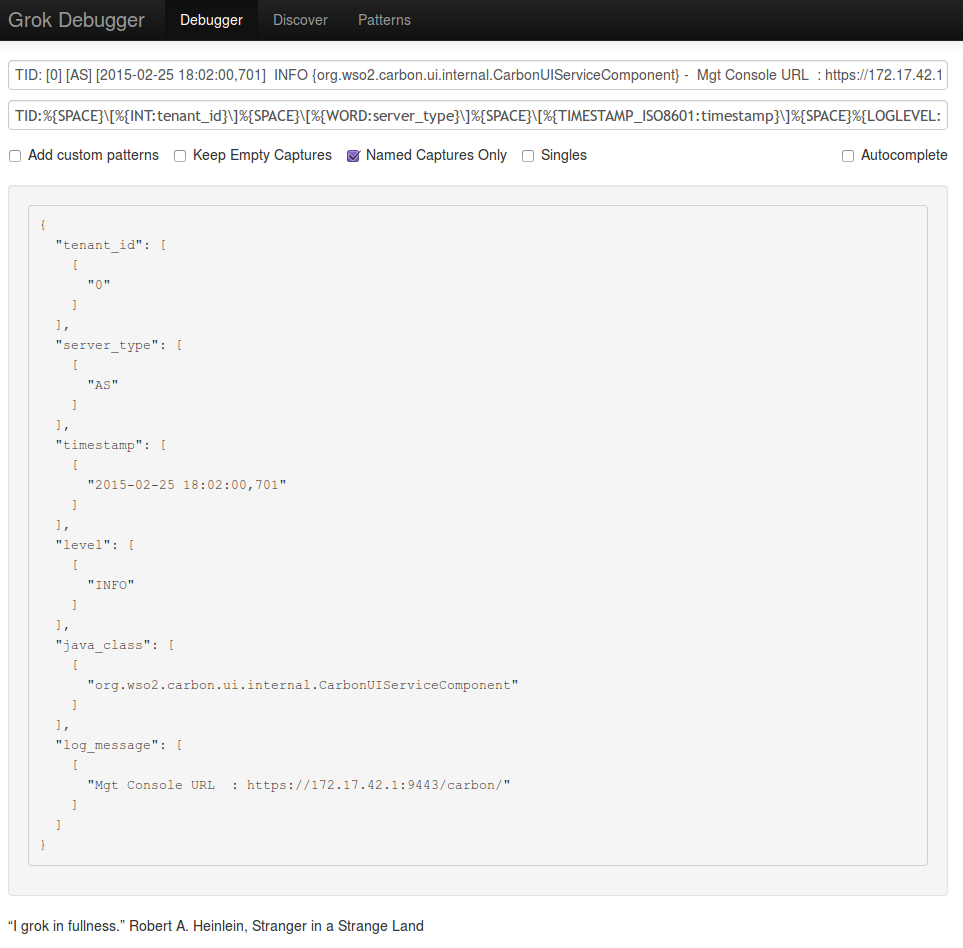
The ELK stack  is a popular stack for searching and analyzing data. Many people use it for analyzing logs. WSO2 also has a full-fledged Big Data Analytics Platform, which can analyze logs and do many more things. In this blog post, I'm explaining on how to monitor logs with  Elasticsearch , Logstash and Kibana . I will mainly explain logstash configurations. I will not show how to set up Elasticsearch and Kibana. Those are very easy to setup and there are not much configurations. You can just figure it out very easily! :) If you want to test an elasticsearch server, you can just extract the elasticsearch distribution and start an elasticsearch server. If you are using Kibana 3, you need to use a web server to host the Kibana application. With Kibana 4, you can use the standalone server provided in the distribution. Configuring Logstash Logstash  is a great tool for managing events and logs. See  Getting Started with Logstash  if you haven't used ...

Java Mission Control & Java Flight Recorder

Image
Last year, I got two opportunities to talk about Java Mission Control & Java Flight Recorder. I first talked about " Using Java Mission Control & Java Flight Recorder " as an internal tech talk at WSO2 . I must thank Srinath for giving me that opportunity. After that, Prabath also invited me to do a talk at Java Colombo Meetup . Prabath, Thank you for inviting me and giving me the opportunity to talk at the Java Colombo Meetup! I'm also very excited to see that Marcus Hirt , the Team Lead for Java Mission Control has mentioned about the Java Colombo Meetup in his blog post: " My Favourite JMC Quotes ". It's so nice to see "Sri Lanka" was mentioned in his blog post! :) From Marcus' Blog Here are the slides used at the meetup. Java Colombo Meetup: Java Mission Control & Java Flight Recorder from Isuru Perera Marcus Hirt's blog posts really helped me to understand JMC & JFR concepts and his t...

Java JIT Compilation, Inlining and JITWatch

Dr. Srinath  recently shared an InfoQ article with us and its title is " Is Your Java Application Hostile to JIT Compilation? ". I'm writing what I learnt from that article in this blog post. Overview of Just-In-Time (JIT) compiler Java code is usually compiled into platform independent bytecode (class files) using "javac" command. This "javac" command is the  Java programming language compiler . The JVM is able to load the class files and execute the Java bytecode via the Java interpreter. Even though this bytecode is usually interpreted, it might also be compiled in to native machine code using the JVM's Just-In-Time (JIT) compiler.  Unlike the normal compiler, the JIT compiler compiles the code (bytecode) only when required. With JIT compiler, the JVM monitors the methods executed by the interpreter and identifies the “hot methods” for compilation. After identifying the Java method calls, the JVM compiles the bytecode...

Oracle Java Installation script for Ubuntu

Few months ago, I wrote a blog post on Installing Oracle JDK 7 (Java Development Kit) on Ubuntu . It has several steps to install the JDK on Ubuntu. Every time when there is a new version, I upgrade the Java version in my laptop. Since I do few repetitive steps for every Java installation, I wrote a simple installation script for Java. The installation script is available at GitHub:  https://github.com/chrishantha/install-java You just have to run "install-java.sh" with root privileges once you download the JDK from Oracle. It also supports the installation of JDK Demos and "Java Cryptography Extension (JCE) Unlimited Strength Jurisdiction Policy Files" Please refer the install-java.sh README at GitHub.  The script supports JDK 7 and JDK 8. Please try the installation scripts and let me know any feedback! :)

Enabling Java Security Manager for WSO2 products

Why Java Security Manager is needed? In Java, the Security Manager is available for applications to have various security policies. The Security Manager helps to prevent untrusted code from doing malicious actions on the system.  You need to enable Security Manager, if you plan to host any untrusted user applications in WSO2 products, especially in products like WSO2 Application Server . The security policies should explicitly allow actions performed by the code base. If any of the actions are not allowed by the security policy, there will be a SecurityException .  For more information on this, you can refer Java SE 7 Security Documentation . Security Policy Guidelines for WSO2 Products When enabling Security Manager for WSO2 products, it is recommended to give all permissions to all jars inside WSO2 product. For that, we plan to sign all jars using a common key and grant all permissions to the signed code by using "signedBy" grant as follows. grant sign...

Java Performance Monitoring Libraries

There is a proposal to  build performance probes in WSO2 Platform . For that I started looking in to some performance monitoring libraries. Following libraries were mentioned in the WSO2 architecture thread. Metrics Parfait JAMon (Java Application Monitor) While looking in to these libraries, I found out about following also. Java Simon - Simple Monitoring API Perf4J Here is a quick comparison of each project. These comparison criteria are based on the requirements in above proposal. Metrics Parfait JAMon Java Simon Perf4J License Apache License 2.0 Apache License 2.0 JAMon License New BSD License Apache License 2.0 Source GitHub Google Code Sourceforge GitHub GitHub Latest Version 3.1.0 0.2.8 2.79 4.0.0 0.9.16 Last Published Sep 4, 2014 Jun 01, 2011 Aug 20, 2014 Oct 29, 2014 Oct 16, 2011 Java Version - Java 6 - Java 7 - Counts Yes Yes Yes Yes No Timings Yes Yes Yes Yes Yes JMX Support Yes Yes No Yes Yes Enable/Disable No No* Yes Yes Yes* * Not ...